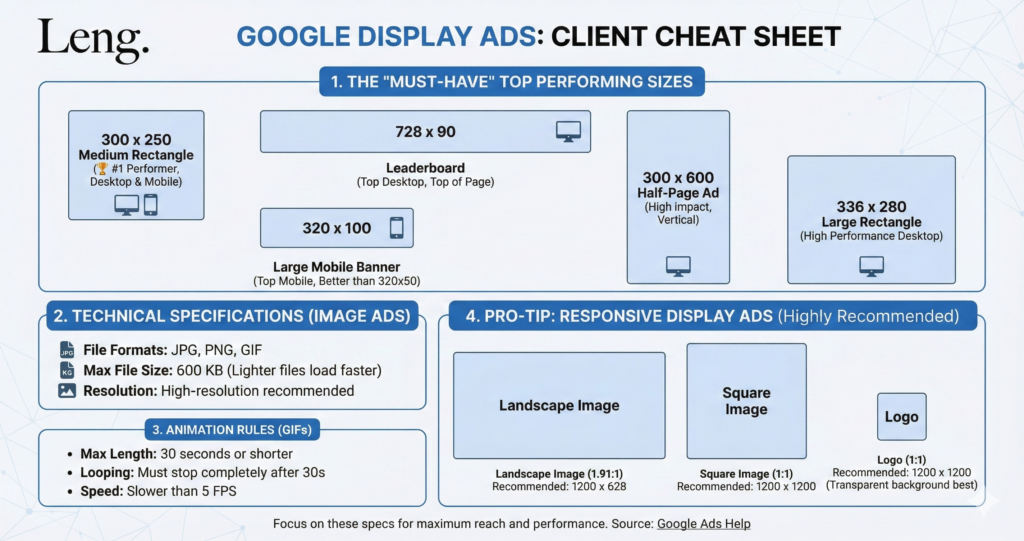
Download it using this link. This download includes some bonus material not listed below, such as tips on how to run a powerfully optimised GDN campaign 🔥
The Google Display Network (GDN) reaches 90% of internet users. However, using the wrong image specs or file types results in blurry ads or disapprovals. Use the cheat sheet below to optimize your assets.
Top Performing Ad Sizes (The "Big 5")
Ad Name
Dimensions (px)
Device Priority
Medium Rectangle
300 x 250
Desktop & Mobile (Highest Inventory)
Leaderboard
728 x 90
Desktop Only (Top of page)
Mobile Leaderboard
320 x 50
Mobile Only
Large Rectangle
336 x 280
Desktop (High CTR)
Half Page
300 x 600
Desktop (Best for Visuals)
Technical File Requirements
Max File Size: 150KB (Strict limit for HTML5 and GIFs).
File Formats: JPG, PNG, GIF, HTML5 (Zip).
Animation Limit: 30 Seconds maximum loop.
Leng Media Pro-Tips
The “20% Text” Rule: While Google removed the strict ban, images with less than 20% text still get cheaper CPMs.
Logo Padding: Always leave a 10px buffer around your logo; don’t push it to the absolute edge.
Button Contrast: Use a CTA button color that contrasts heavily with your background (like our Yellow on Blue).